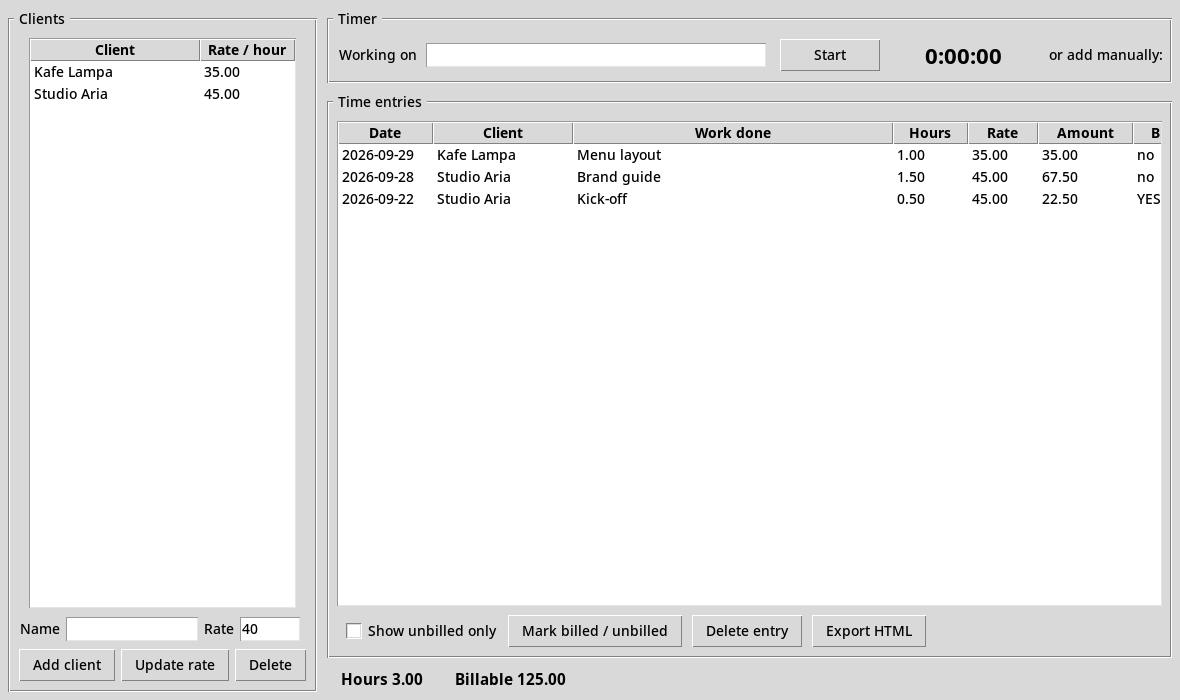
Real screenshot of Sovereign Tally, shown with sample data.
What you need
Python 3.10 or newer - free from python.org.

  Windows : the python.org installer already includes everything. Nothing else to do.
  macOS   : the python.org installer already includes everything. Nothing else to do.
  Linux   : most distributions ship Python without the graphics part (Tkinter).
            Install it once with ONE of these, matching your system:
              Fedora / RHEL    :  sudo dnf install python3-tkinter
              Ubuntu / Debian  :  sudo apt install python3-tk
              Arch             :  sudo pacman -S tk
How to start
Windows        : double-click run.bat
  macOS / Linux  : double-click run.sh, or in a terminal:  ./run.sh
How to use it
Add client         - name and hourly rate
  Select the client  - then use the timer
  Start / Stop       - times the work and saves it
  Add hours          - type 1.5 instead, if you forgot to time it
  Show unbilled only - exactly what you have not invoiced yet
  Mark billed        - tick it off once you have invoiced it
  Export HTML        - a timesheet to send or attach to an invoice
Where your data lives
One single file: ~/sovereign_tally.db
Back it up by copying that file somewhere safe. That is the entire backup.
What you download
sovereign_tally.py
README.txt
run.sh
run.bat
Start files included: run.sh, run.bat.
Full README
Read the exact README included in your download
SOVEREIGN TALLY - Offline Billable Time Tracker
(c) 2026 Spiridon Tsakonas (Cyrus Nash) - Light in the Dark Solutions - All Rights Reserved

WHAT THIS IS
A fully offline desktop program with a normal window and buttons.
Your data never leaves your computer. No internet. No account. No subscription.

WHAT YOU NEED
Python 3.10 or newer - free from python.org.

  Windows : the python.org installer already includes everything. Nothing else to do.
  macOS   : the python.org installer already includes everything. Nothing else to do.
  Linux   : most distributions ship Python without the graphics part (Tkinter).
            Install it once with ONE of these, matching your system:
              Fedora / RHEL    :  sudo dnf install python3-tkinter
              Ubuntu / Debian  :  sudo apt install python3-tk
              Arch             :  sudo pacman -S tk

HOW TO START IT
  Windows        : double-click run.bat
  macOS / Linux  : double-click run.sh, or in a terminal:  ./run.sh

HOW TO USE IT
  Add client         - name and hourly rate
  Select the client  - then use the timer
  Start / Stop       - times the work and saves it
  Add hours          - type 1.5 instead, if you forgot to time it
  Show unbilled only - exactly what you have not invoiced yet
  Mark billed        - tick it off once you have invoiced it
  Export HTML        - a timesheet to send or attach to an invoice

PRINTING / PDF
Export HTML writes a clean invoice file. Open it in any browser and use
the browser's own Print command to print it or save it as a PDF.

WHERE YOUR DATA LIVES
One single file: ~/sovereign_tally.db
Back it up by copying that file somewhere safe. That is the entire backup.

ONE-TIME PURCHASE
You bought this outright. It is yours forever, offline, on your own machine.
No subscription, no renewal, no account, nothing to cancel.
Support
Problems with a download or getting started? Email [email protected]. Refunds within 14 days, no reason needed: refund policy.